

Contract Lifecycle
Contract statuses, and when to edit a contract versus add a phase
A contract in Vayu moves through a series of statuses, from its creation to its renewal or end. This page explains how to change a contract's terms safely, what happens to its invoices when you do, and what each contract status means.
The most important rule on this page: once any invoice on a contract is approved, you can no longer edit the contract. Use a phase to change its terms from a given date.
Changing a contract: Edit or New phase
There are two ways to change a contract after you create it. They serve different purposes.
- Edit corrects a contract that was set up wrong. Vayu rewrites the contract as if it had been created correctly from the start. No history is kept.
- New phase records a real change to the commercial terms from a specific date, such as a price update, an upgrade, a downgrade, or added or removed products. The previous terms stay on record and keep applying before that date.
Which one is available
Vayu decides based on a single question: does the contract have an approved invoice?
| Contract state | Button on the contract page | What you can do |
|---|---|---|
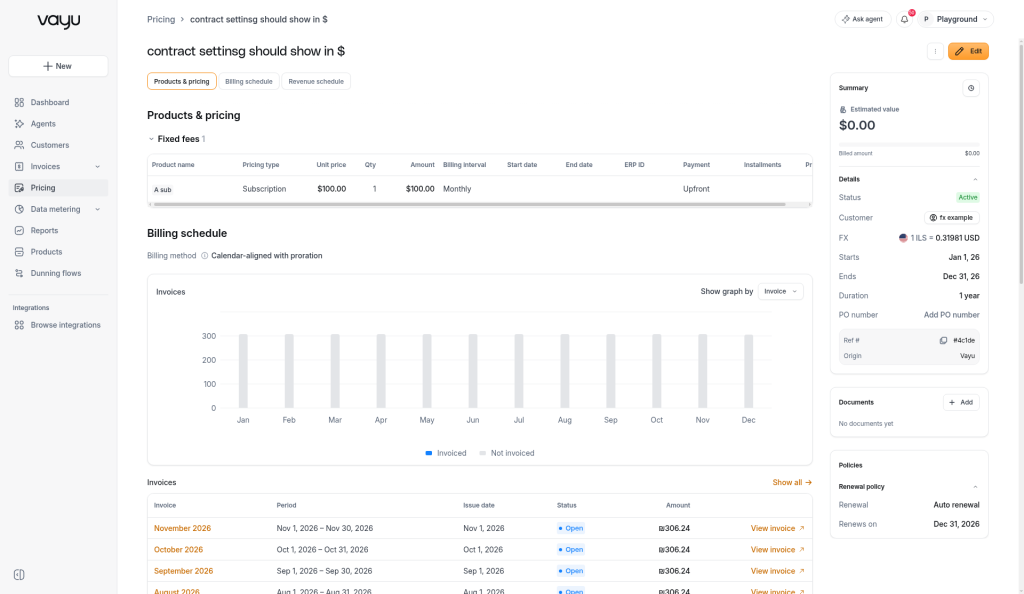
| No approved invoice yet | Edit | Correct anything: products, prices, start date, duration, billing interval, trial |
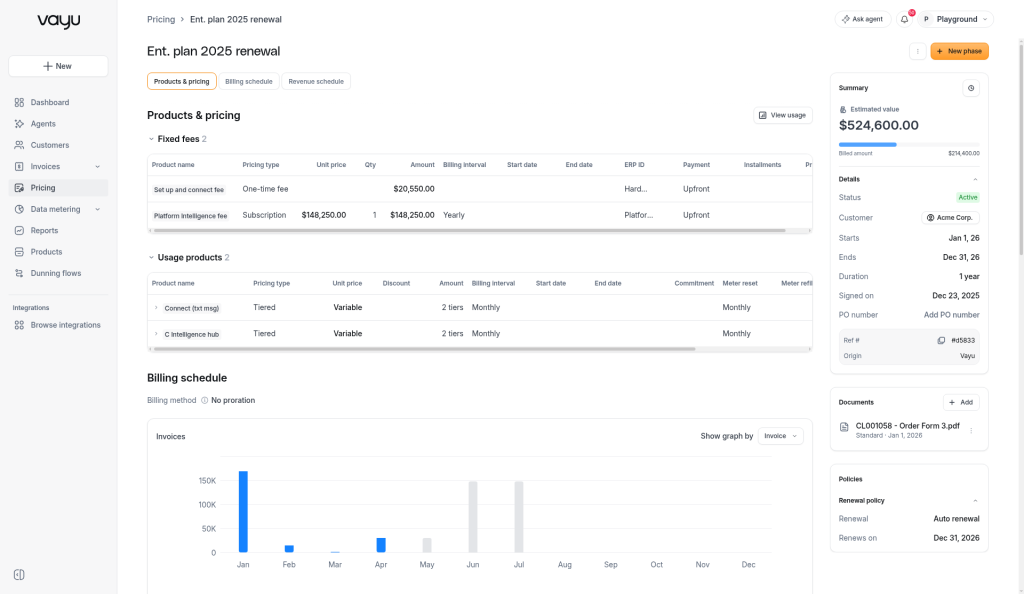
| At least one approved invoice | + New phase | Change terms from an effective date onward. Earlier terms and approved invoices are kept |
| Termination or Pending termination | Neither | The contract can no longer be changed |
The contract page shows Edit in the top-right corner.
The contract page shows + New phase in the top-right corner.
Decision table
| You want to… | Use |
|---|---|
| Fix a wrong price, product, or date before any invoice is approved | Edit |
| Change the start date, duration, or billing interval | Edit (only possible before the first approval) |
| Raise or lower a price from a date, for example an annual price increase | New phase |
| Upgrade or downgrade: add, remove, or change products mid-term | New phase |
| Extend the contract while changing its terms | New phase with Co-term turned off and a new end date |
| Renew the contract on new terms after it ends | Renewal options → Update terms & Renew in the contract's ⋮ menu |
| Fix a mistake on an invoice that is already approved | Neither. Fix it on the invoice: Reissue, credit note, or cancel (see below) |
Phases are for changes to the commercial agreement, not for fixing mistakes on approved invoices. Fix the invoice instead:
- Usage was incorrect when the invoice was approved: use Reissue on the invoice. Vayu cancels the existing invoice and creates a new one that picks up the current, corrected usage.
- The invoice was already sent to the customer: issue a credit note, then cancel the invoice.
- The invoice was approved but not sent yet: simply cancel it.
Edit a contract
Use Edit when the contract was created with a mistake and no invoice has been approved yet.
Open the contract and click Edit. You can also choose Edit from the ⋮ menu in the contracts list.
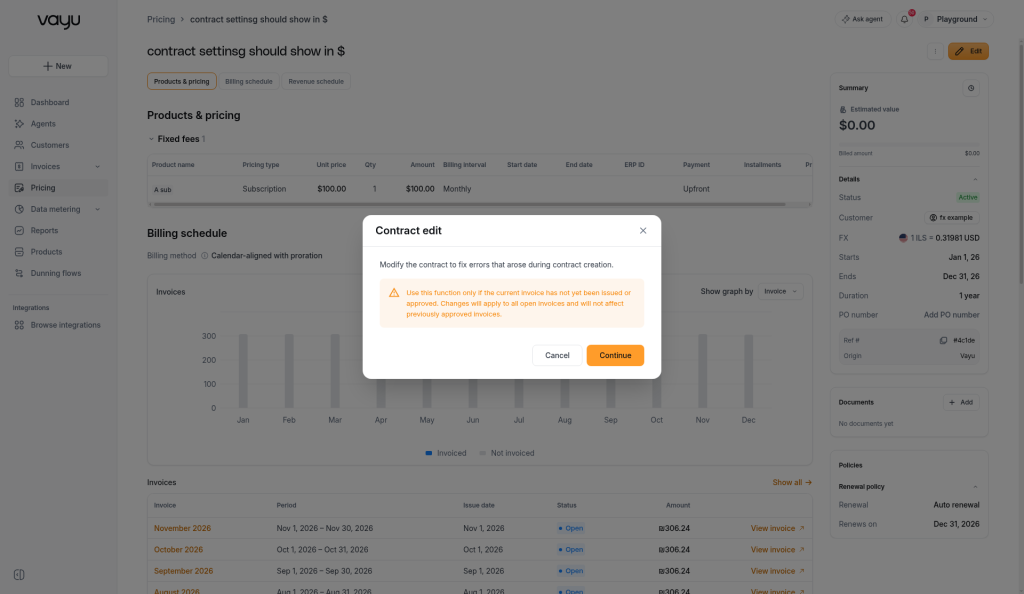
Read the Contract edit dialog and click Continue. The dialog reminds you that changes apply to all open invoices and don't affect invoices that were already approved.
Make your changes in the plan builder and save.
When you save an edit:
- The contract's products and terms are replaced with the new ones.
- Every invoice that isn't approved is deleted and generated again for the whole contract term, using the corrected terms.
- If you changed the start date, duration, or trial, Vayu recalculates the end date. A manually changed end date is reset to start date plus duration. An end date that was extended by auto-renewal is kept.
- The contract status is recalculated. For example, it becomes Scheduled if the new start date is in the future.
Edit is not available once an invoice is approved, or once the contract has phases.
Add a phase
Use + New phase when the customer's commercial terms change from a specific date.
Open the contract and click + New phase.
In Update and add phase to this contract, fill in the phase details:
- Phase effective as of: the date the new terms start. It must be after the start of the latest phase (or the contract start) and no later than the contract end date.
- Name this phase (optional).
- Label: a tag that describes the change, such as Ramp-up, Grace period, Free trial, Price update, or Milestone. The default is Price update. The label is for your reference only and does not affect pricing.
- Uplift all product prices by (optional): raise every product price by a percentage.
- Co-term: keep this on to end the phase with the contract. Turn it off to set a New contract end date, which lets the phase extend or shorten the contract.
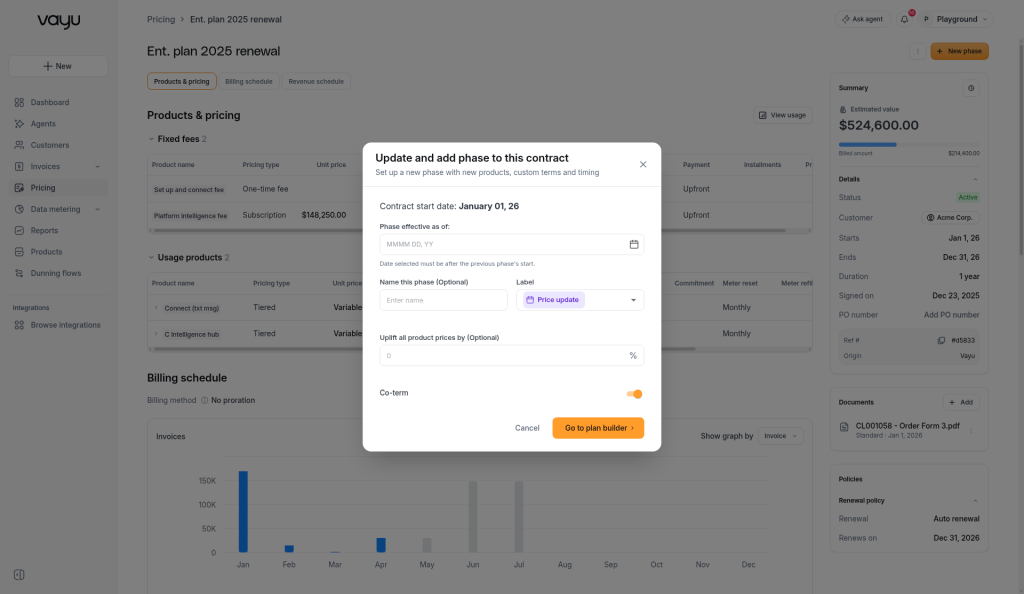
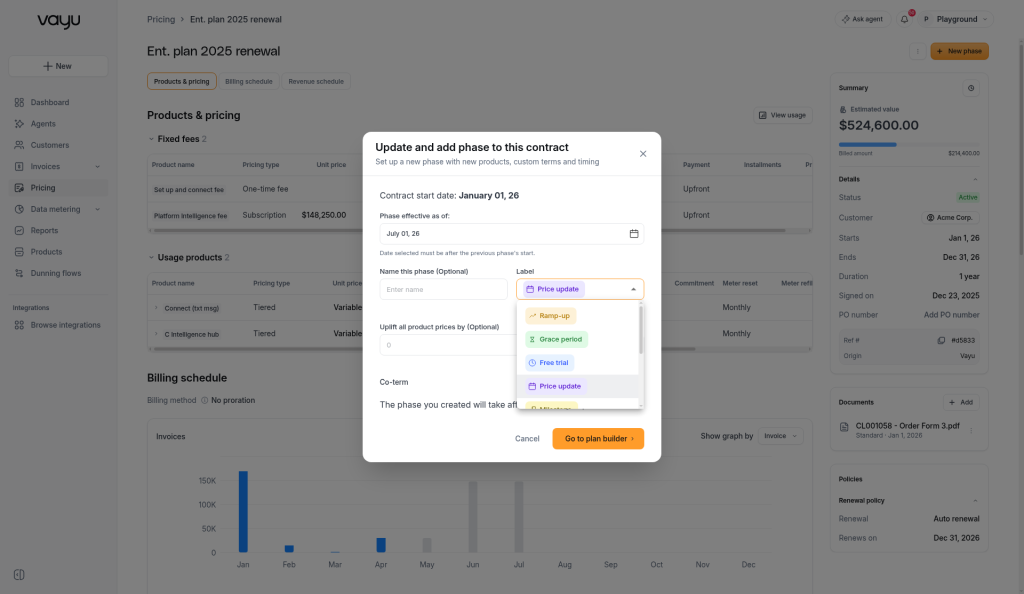
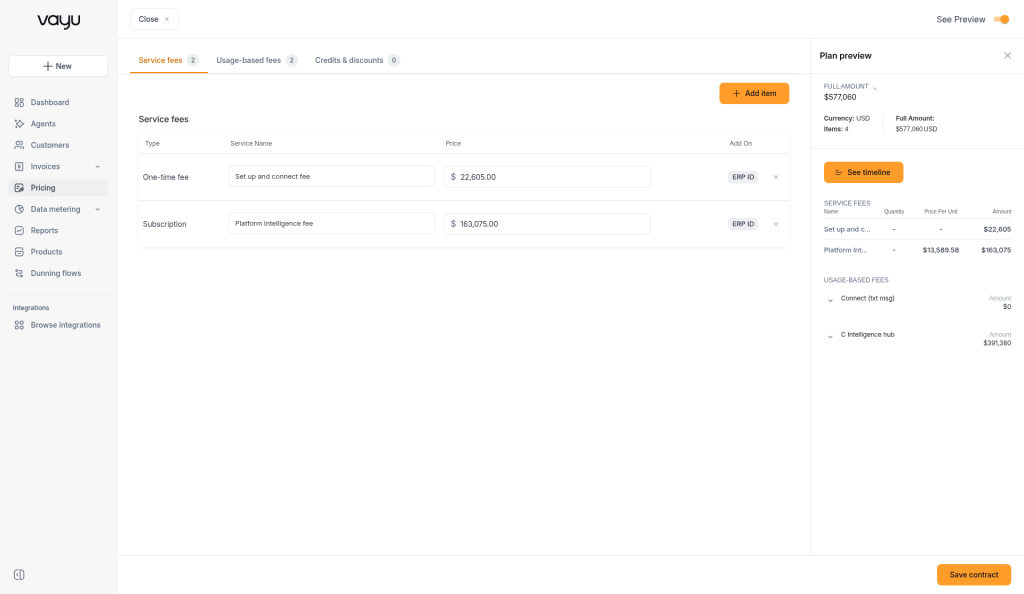
Click Go to plan builder. In the plan builder, change the products and prices for the new phase. If you entered an uplift percentage, the new prices already include it. Click Save contract.
Review the summary in Your updated contract is ready to go and click Update contract.
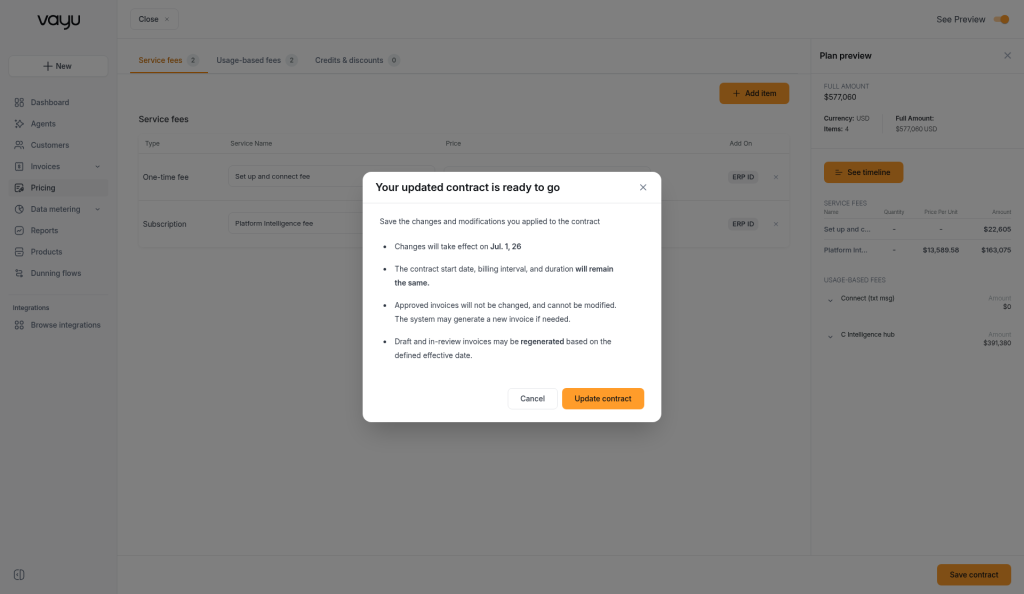
When you save a phase:
- Approved invoices are never changed.
- Invoices that aren't approved yet are generated again. Periods before the effective date use the previous terms, and periods from the effective date use the new terms.
- If the effective date falls in the middle of a billing period, that period is split and each part is prorated by days. The phase also starts a new billing period, so the contract gains one invoice.
- Recurring revenue (MRR/ARR) reflects the new price from the month the phase starts.
- The contract start date, billing interval, and duration stay the same.
A few rules apply to phases:
- You can't lower the commitment of a product that already exists on the contract.
- You can't change the meter of a usage product that already exists on the contract. Its meter field is locked and shows Locked in a phase. To bill it from a different meter, remove the product in the phase and add a new product with the new meter.
- You can only edit or delete the latest phase, meaning the one with the latest effective date.
- You can't edit or delete a phase once an invoice covering it is approved.
- Phases are always ordered by effective date, not by the order you created them.
Prepaid products. If Auto-credit unused prepaid on phase change is turned on in Invoice Preferences, Vayu credits the customer for the unused part of prepaid charges that were already approved when a phase changes or removes those products. The credit is prorated by days.
For more on phases, see Phases.
Examples
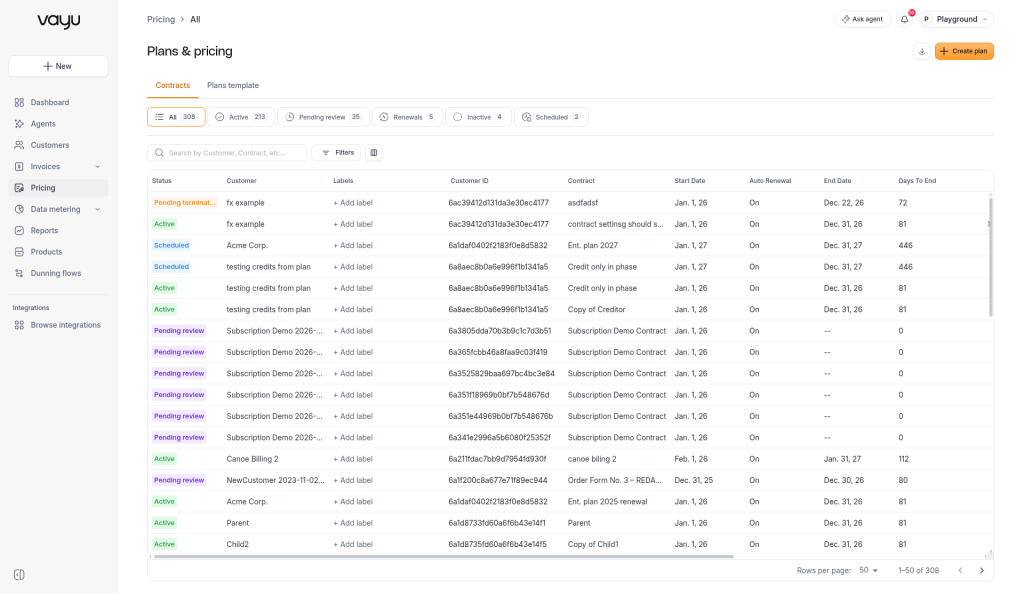
Contract statuses
| Status | What it means | Are invoices generated? |
|---|---|---|
| Pending review | The contract was created automatically, for example by Contract Intake or a CRM import, and is waiting for someone to review it | No, not until it is approved |
| Scheduled | The start date is in the future | Yes, in advance, for the whole term |
| Active | The contract is live | Yes |
| Inactive | The contract was deactivated manually | Draft invoices are removed. The contract can be reactivated |
| Pending termination | A termination date is set in the future | Yes, up to the termination date |
| Termination | The contract was terminated (ended early) | No invoices after the termination date |
| Expired | The contract reached its end date without renewing | No invoices after the end date |
Hover over a Termination or Pending termination status to see the termination date.
To learn how invoices move from draft to approval and payment, see Invoices Overview.