

Slack
Vayu–Slack Integration
Vayu supports a native Slack integration that lets your team connect a Slack workspace, configure notification delivery, and interact with selected Vayu workflows directly from Slack.
Overview
The Slack integration connects your Slack workspace to Vayu so that Vayu can send approval requests, direct notifications, and automated updates to Slack. The integration also supports interactive Slack actions for supported workflows.
A workspace admin or authorized Slack user must connect Slack to Vayu through the Slack OAuth flow.
Capabilities
Once connected, the Slack integration supports workspace authorization through OAuth and notification delivery to selected Slack destinations. Teams can configure a Slack channel for automated notifications and use Slack interactions for supported approval workflows.
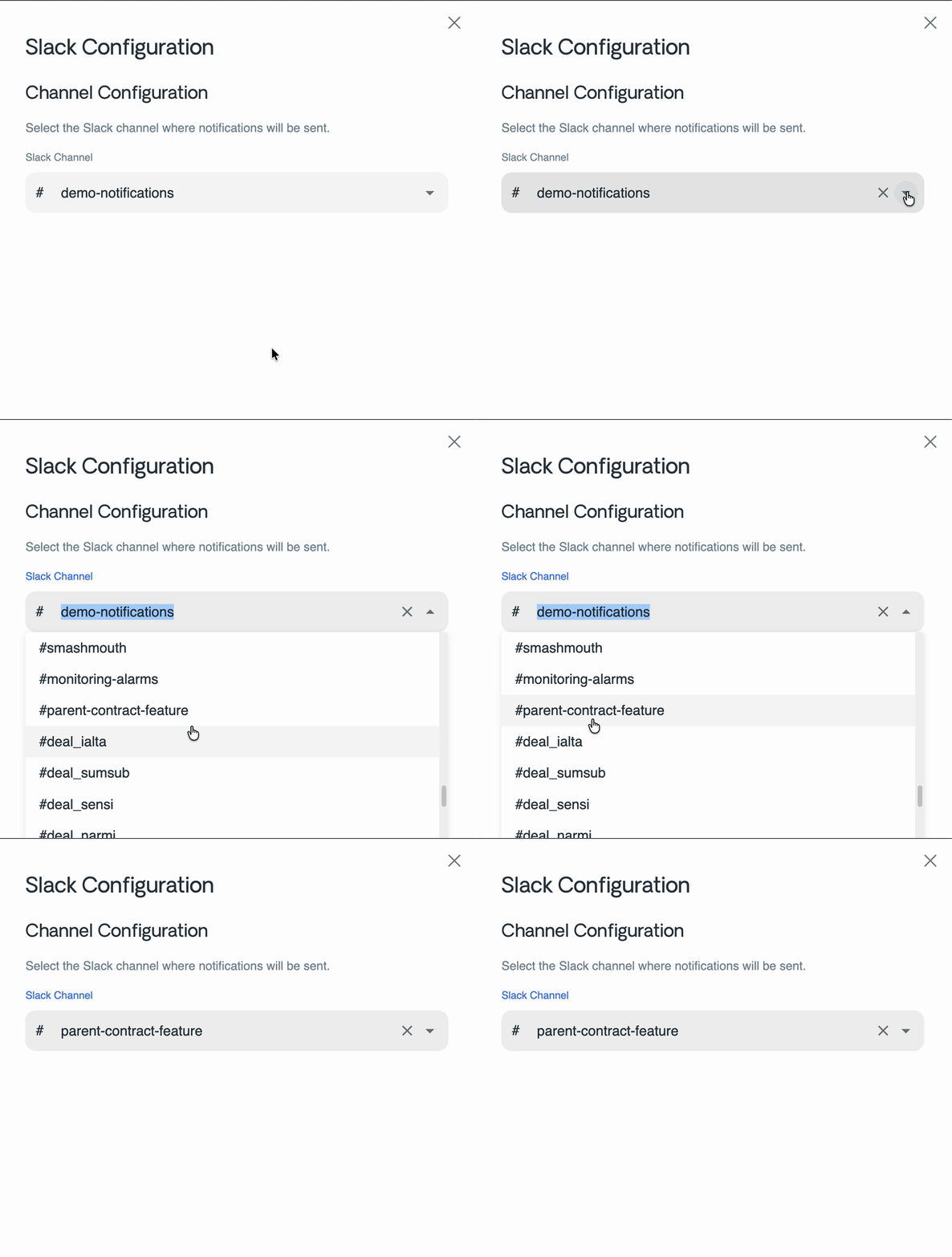
Vayu can also retrieve Slack users and channels from the connected workspace to support configuration and notification flows. Slack users and channels are available only when the integration is active.
How It Works
To use the Slack integration, start from the Vayu integrations settings and connect your Slack workspace. Slack will ask an authorized user to approve the connection. After authorization, Vayu stores the workspace connection and makes Slack available for supported notifications and workflow actions.
After Slack is connected, choose the Slack channel that should receive automated notifications. Vayu uses this saved channel for channel-based notifications. If no channel is configured, automated channel notifications cannot be delivered.
Supported Flows
The Slack integration currently supports the following flows:
- Connect a Slack workspace from the Vayu integrations UI.
- Authorize Vayu in Slack through the OAuth flow.
- Configure the Slack channel that should receive automated notifications.
- Send direct or channel notifications, depending on the workflow.
- Handle supported interactive Slack actions.
Interactive Actions
Vayu supports interactive Slack actions for selected workflows. The primary supported action is invoice approval.
When a user approves an invoice from Slack, Vayu updates the invoice status to Approved and updates the Slack message to reflect the completed action.
Important Behavior and Limitations
Automated channel notifications require a saved Slack channel in the integration configuration. If no channel is selected, channel-based notification delivery will fail.
Interactive actions are limited to the workflows currently implemented in Vayu. At present, the primary supported interactive workflow is invoice approval.