

QuickBooks
Vayu–QuickBooks Integration
Vayu specializes in unifying contract commercials and usage data into a single revenue management platform. QuickBooks offers a powerful way for businesses to handle key financial and operational tasks, including accounting and financial management. Integrating the two platforms ensures that your billing and revenue information is fully up to date and aligned at all times, no matter where you're accessing it.
Vayu integrates smoothly and swiftly with QuickBooks, offering robust two-way synchronization for your billing and revenue workflows. Not only do you achieve data consistency across platforms, you can also seamlessly automate critical finance operations.
Overview
The Vayu-QuickBooks integration supports two-way syncs, with data syncing from Vayu and other information from QuickBooks.
You are given multiple options for syncing with the integration.
You can opt for Manual Sync on a per-invoice basis, Bulk Sync for multiple-invoice approval in a single batch, and two different options for Auto Sync. You can implement Auto Sync by Invoice Issue Date or Auto Sync on Approval.
From Vayu → QuickBooks
- Invoice Issuance: Syncs fixed, usage, or hybrid invoices for prepaid, post-paid, or mixed periods. Metadata includes period start/end, product lines, discounts, taxes, Vayu invoice#
- Credit Notes: For cancellations, refunds, overages, then reconciled/mapped to original invoice
- Payments: Pushes payment status (paid, partial, failed, etc.); reconciles invoices with payment records
- Refunds: Triggers refund issuance and sync refund metadata (amount, date, reason).
- Customer & Contract Sync: Links invoices to QuickBooks customers, optionally mapping Vayu contracts to Quickbooks projects, jobs, or contracts. Also syncs customer details (name, address, email, external IDs).
- Products / Items
- Sync Vayu products to ERP catalog for revenue mapping.
- Include metadata: product ID, SKU, revenue category, tax class.
- GL Account Mapping: Enables per-line or per-product mapping to QuickBooks chart of accounts (income, AR, tax).
- Custom Metadata: Syncs custom fields like Class, Department, and Tags for financial reporting or segmentation.
From QuickBooks → Vayu
- Invoice Status Updates: Retrieves updated status (Paid, Overdue, Voided) from QuickBook to sync back into Vayu.
- Customer Metadata: Pulls updates to customers
- Product Metadata: Pulls updates to product definitions (e.g., class assignments, GL mappings).
Prerequisites & Permissions
You'll need the following to get started:
- QuickBooks account
- Vayu account
- Permissions and Admin support
Connection & Setup
To launch initial setup and integrations, please contact the Vayu support team.
From Vayu, click Connect to QuickBooks.
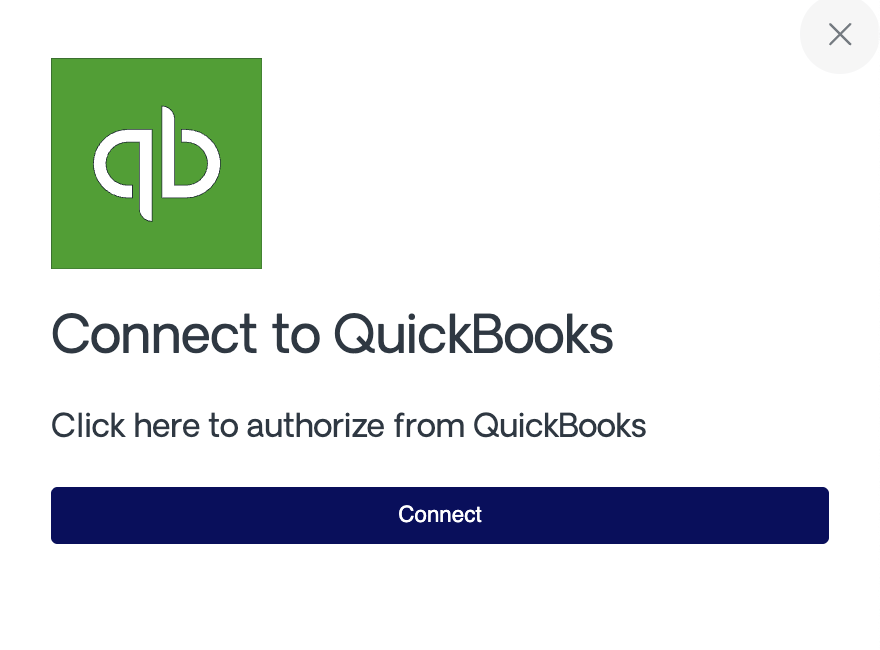
Next, sign in with your QuickBooks admin or accountant account.
Finally, authorize Vayu to access the required accounting data.
Once connected, Vayu will begin pulling customer and product metadata and will allow invoice syncs according to your settings.
Configurations
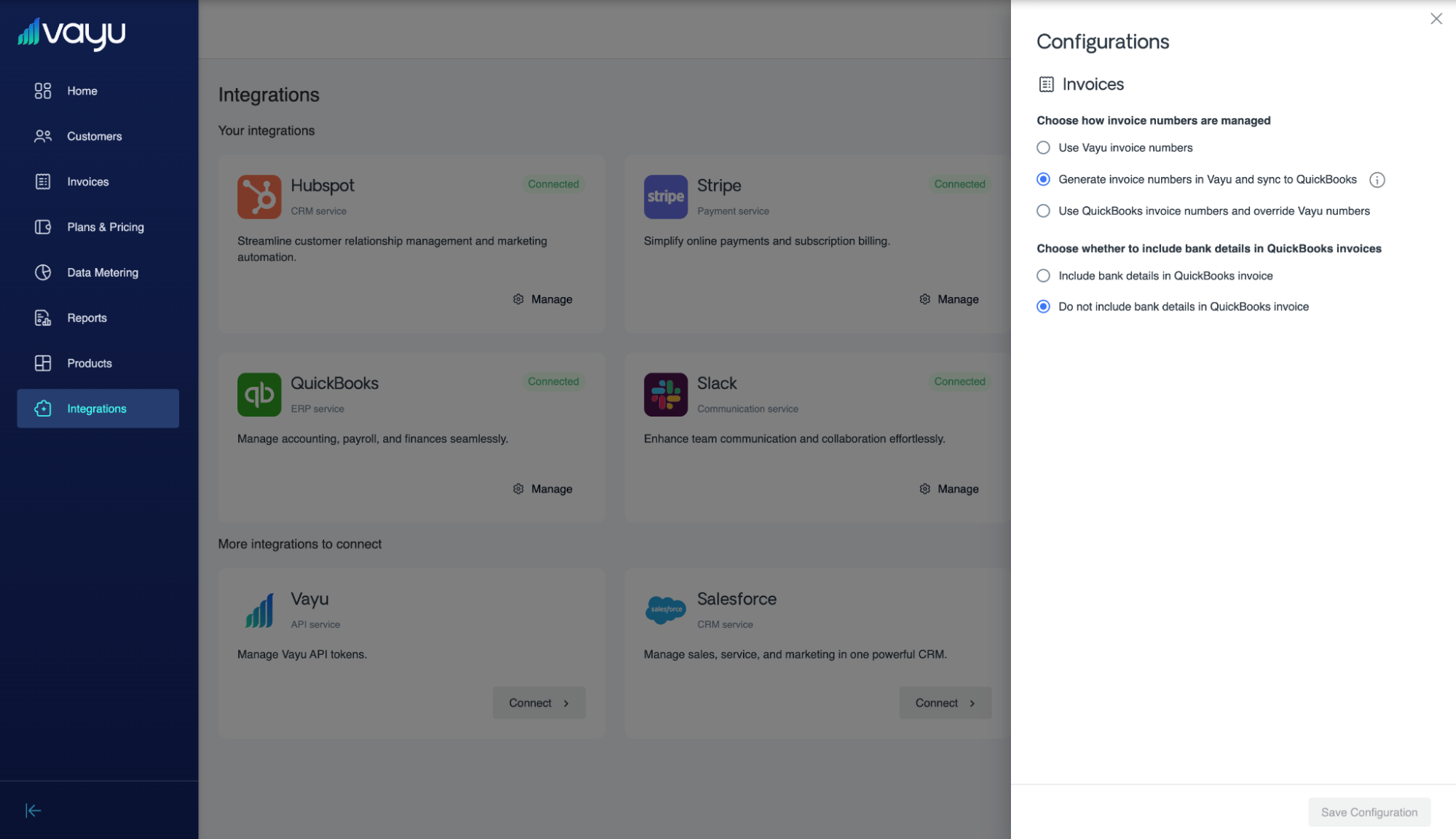
Set up configurations by clicking on QuickBooks on the integration page. A panel with various settings will open to the right side of the page:
Invoices
You have two configurations to consider for invoices with QuickBooks and Vayu.
First, choose which invoice number to use:
- ⦾ Use Vayu invoice number
- ⦾ Generate invoice numbers in Vayu and sync to QuickBooks
- ⦾ Use QuickBooks invoice numbers and override Vayu numbers
Second, choose whether or not to include bank details:
- ⦾ Include
- ⦾ Don't include
Capabilities
The main capabilities of the integration include:
- Syncing Vayu invoices into QuickBooks
- Syncing Vayu invoices as sales orders into QuickBooks
- Syncing invoice status
- From Vayu to QuickBooks
- From QuickBooks to Vayu
- Mapping Vayu customers to QuickBooks customers
- Mapping Vayu products to QuickBooks products
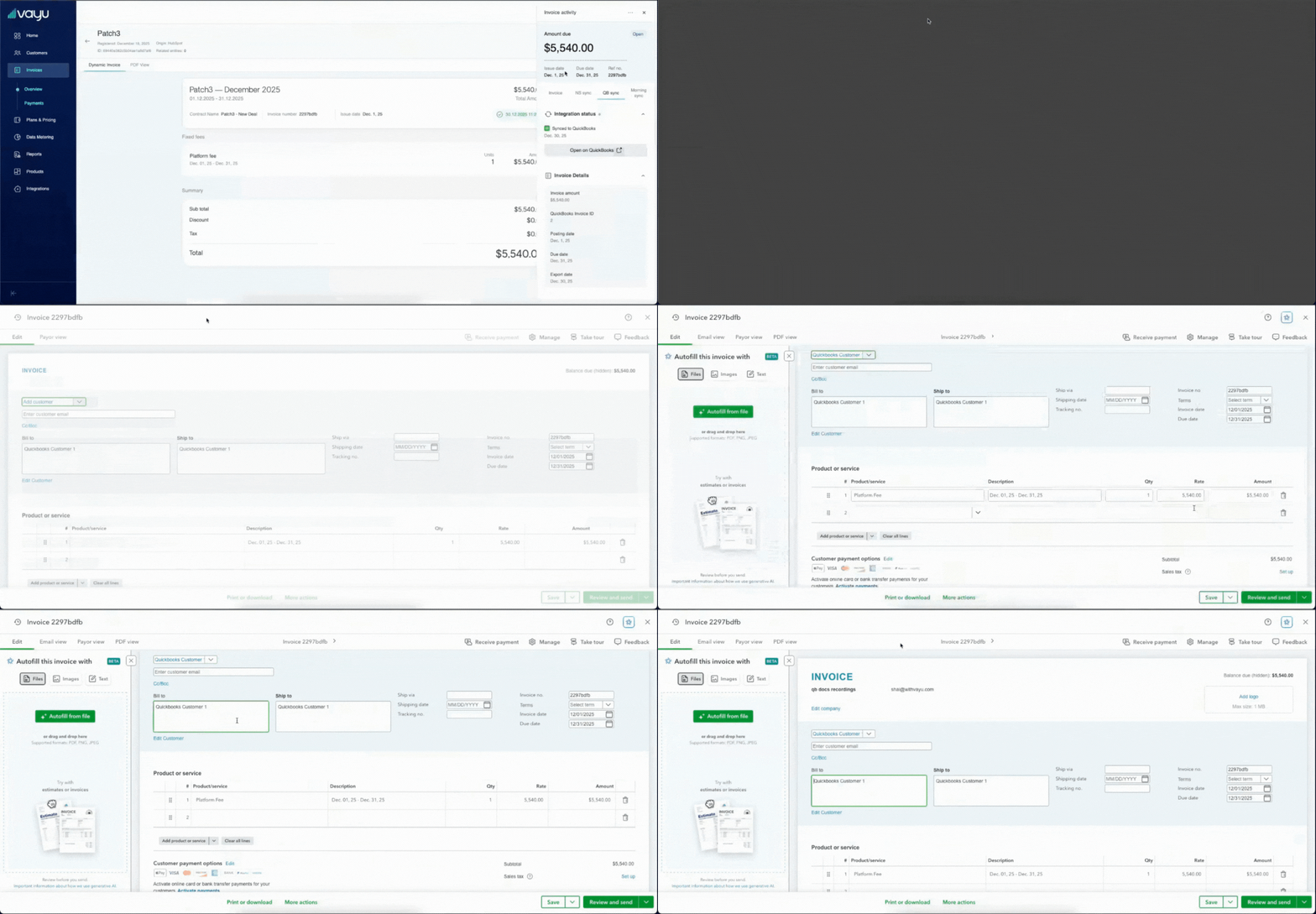
To make sure that all info is up-to-date, select the three dots symbol, then select Sync, then Sync to QuickBooks.
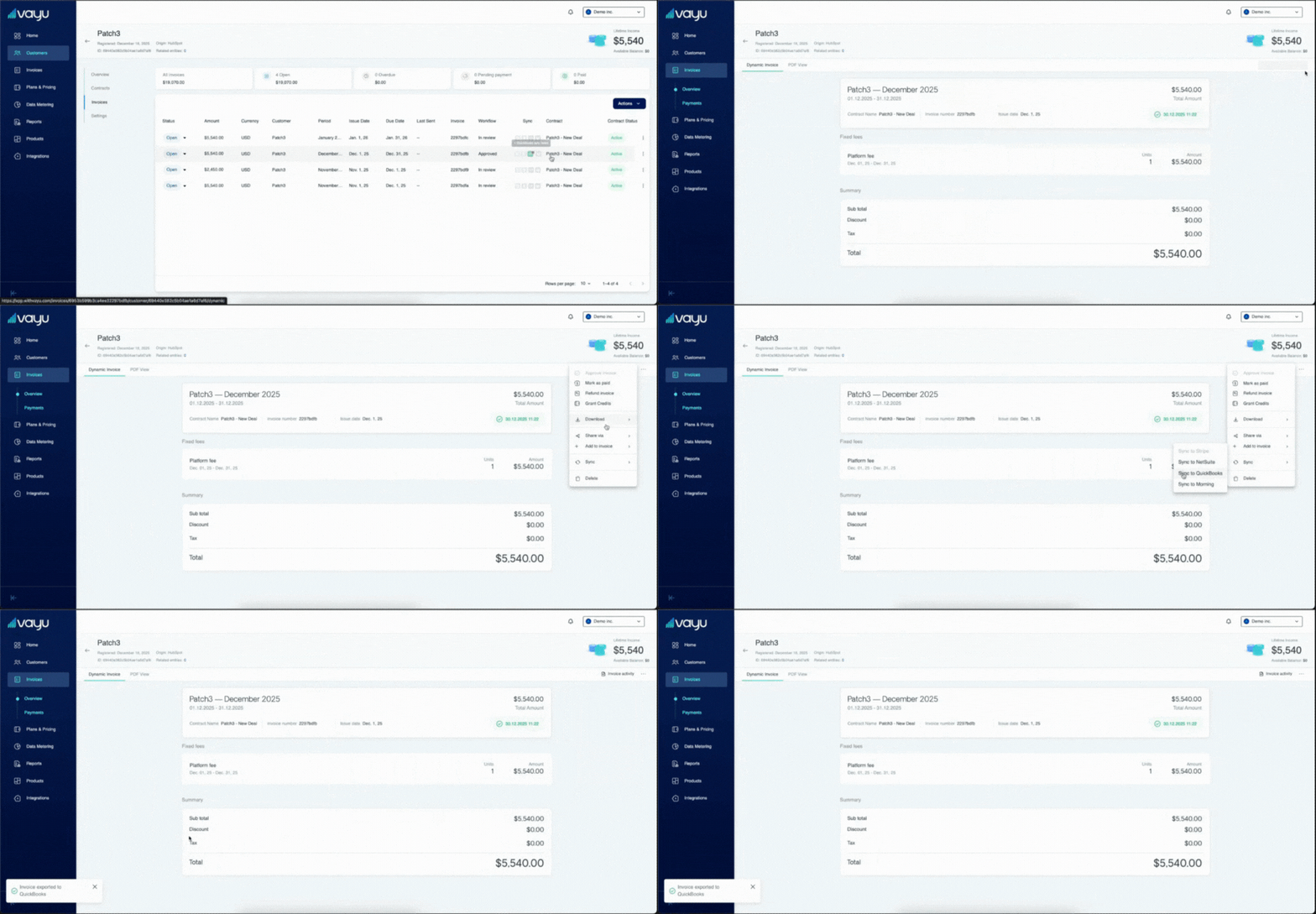
Under QB sync, you can view:
- Integration status
- When data was last synced
- the original invoice by clicking Open on QuickBooks.
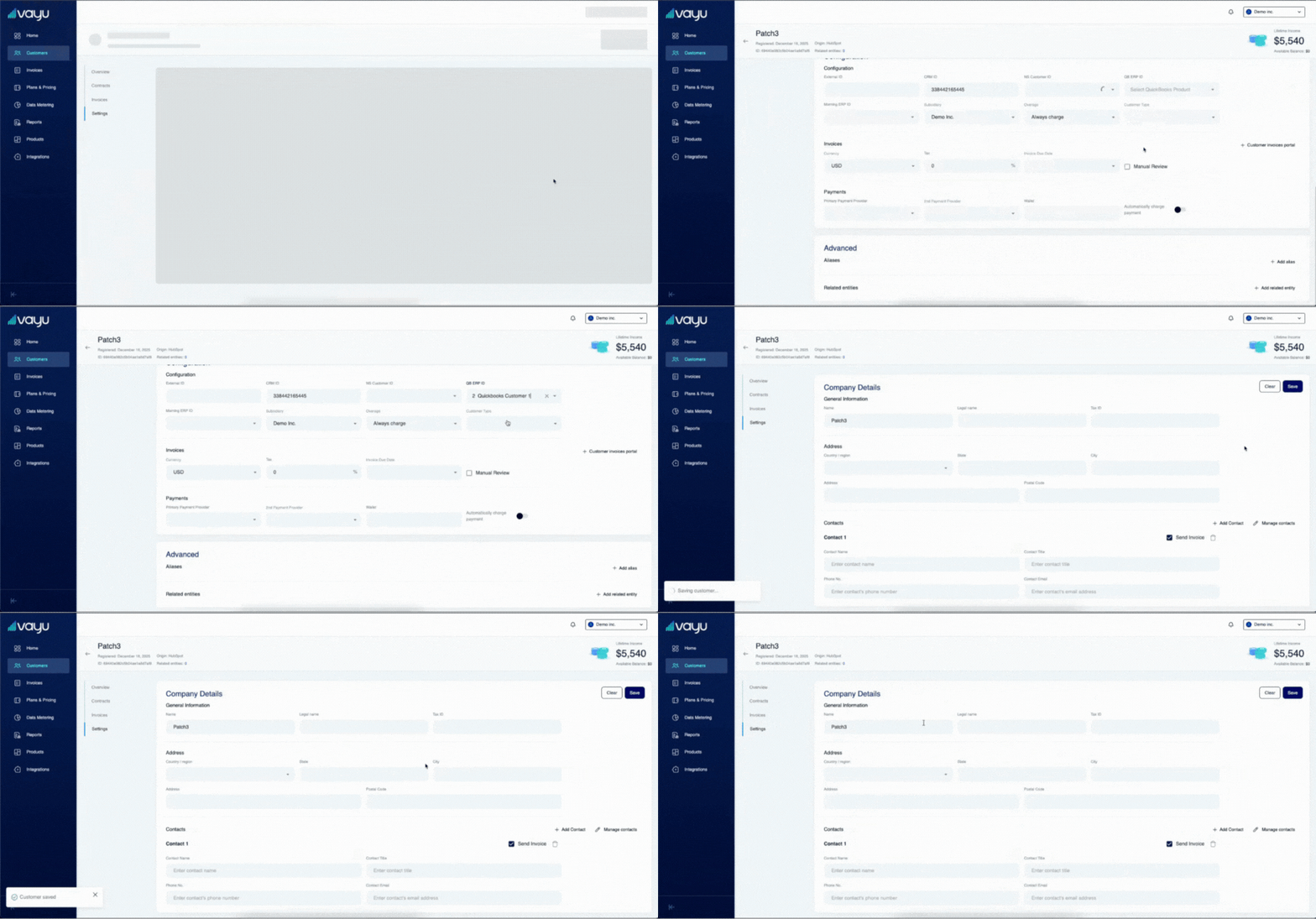
To map your Vayu customer to a QuickBooks customer, go to the customer profile in Vayu and select Settings.
Go to QB ERP ID and select the customer available from your QuickBooks sync, as seen here:
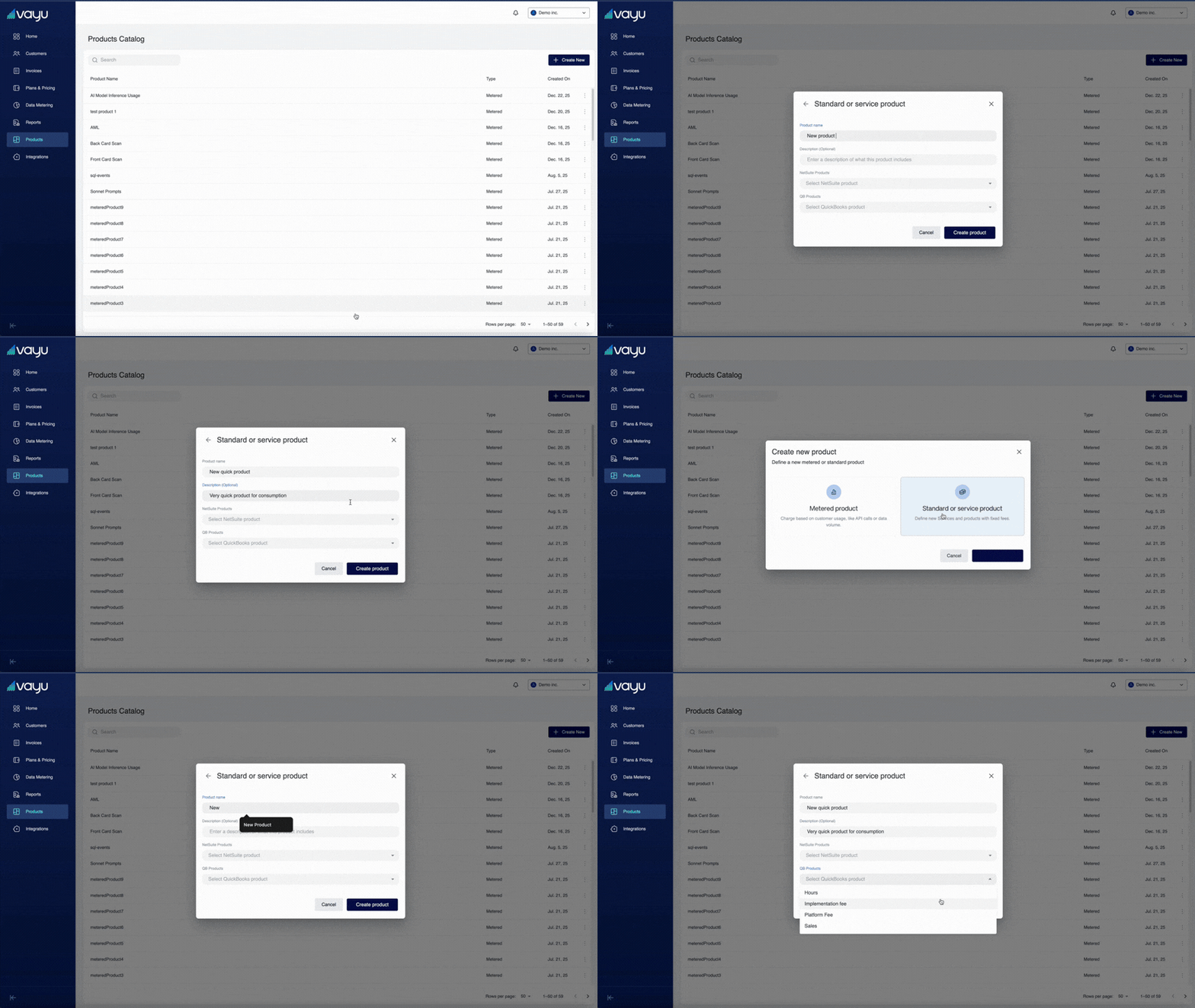
A similar process works for syncing products. Under Products, select + Create New. Fill in the product information, then select from the QB Products dropdown:
Reconciliation
The Vayu-QuickBooks integration tracks failed syncs, catalogs errors, and monitors retries. On top of this, there is duplication prevention when it comes to retries, matching records by unique IDs to avoid conflicts.
Field Mappings & Attribution
- ItemRef: Identifies the QuickBooks product/service
- AccountRef: Income or AR account
- ClassRef: Optional segmentation fields
- CustomerRef: Mapped QuickBooks customer
Logs and Activity Tracking
Vayu ensures proper versioning and reconciliation by logging all synced records with timestamps for audits.
To do this, be sure to enable syncing on validation reports.
All sync activity is tracked inside Vayu:
- Success and failure logs for failed syncs
- Retry attempts
- IDs of created QuickBooks transactions
- Timestamped event history
- Error reasoning/details with user-friendly explanations
These logs help finance teams quickly diagnose and correct issues.
Troubleshooting
Common Issues and Fixes
| Issue | Explanation | Fix |
|---|---|---|
| Missing ItemRef | A Vayu product is not mapped to a QuickBooks Product/Service | Add mapping in Vayu → retry sync |
| Permission error | QuickBooks user lacks access to invoices or items | Reconnect using a QuickBooks admin |
| Rate limit exceeded | QuickBooks Online throttles at 500 req/min | Vayu automatically retries; try bulk sync during lower activity periods |
| Invalid GL mapping | The referenced account is inactive or restricted | Update mapping to an active income or AR account |
| Token expired | OAuth token revoked or expired | Reconnect QuickBooks in Vayu |
QuickBooks Online
The integration is managed by token and OAuth 2.0 authentication.
The Vayu QuickBooks integration can handle up to 500 requests/minute (including retries). It also comes replete with rich support for Chart of Accounts (COA, mapping Vayu products to QuickBook accounts) and segmentation by classes and location.
Additionally, QuickBooks accountants use the same API under the accountant role, but with multi-client and permission nuances.
Refunds
Refunds are handled by Credit Memo and Payment reversal.
QuickBooks Accounting User As Client
QuickBooks accountants use the same API under the accountant role, but with multi-client and permission nuances.
Similarly, this is managed by token access and OAuth 2.0 authentication.
QuickBooks Tax Handling
When integrated with QuickBooks, Vayu supports tax handling that aligns with QuickBooks' native tax engine and reporting structure.
You can control how tax is applied and synced:
- QuickBooks-managed tax: Allow QuickBooks to calculate and apply tax based on its configured rates, jurisdictions, and customer settings.
- Vayu-applied tax: Calculate and include tax in Vayu before syncing invoices to QuickBooks.
- Consistent tax alignment: Ensure invoice structure and tax fields match QuickBooks expectations to reduce reconciliation issues.
Vayu supports both automatic tax calculation in QuickBooks and explicit tax values passed during sync, depending on your workflow.