

Connecting to Vayu
Create an API token, choose its permissions, and make your first authenticated request
To call the Vayu API you need two things from the Vayu app:
- Client id: identifies your organization. Sending it in the
x-api-keyheader is optional today, but we recommend including it on every request. - API token: a long-lived token you create, with the permissions you choose. You exchange it for a short-lived access token by calling
POST /login.
Generate a token
Log in to app.withvayu.com and click Browse integrations in the sidebar.
On the Vayu card, click Connect. If the Vayu card is already under Your integrations, the button reads Manage instead. Either one opens the Vayu API panel.
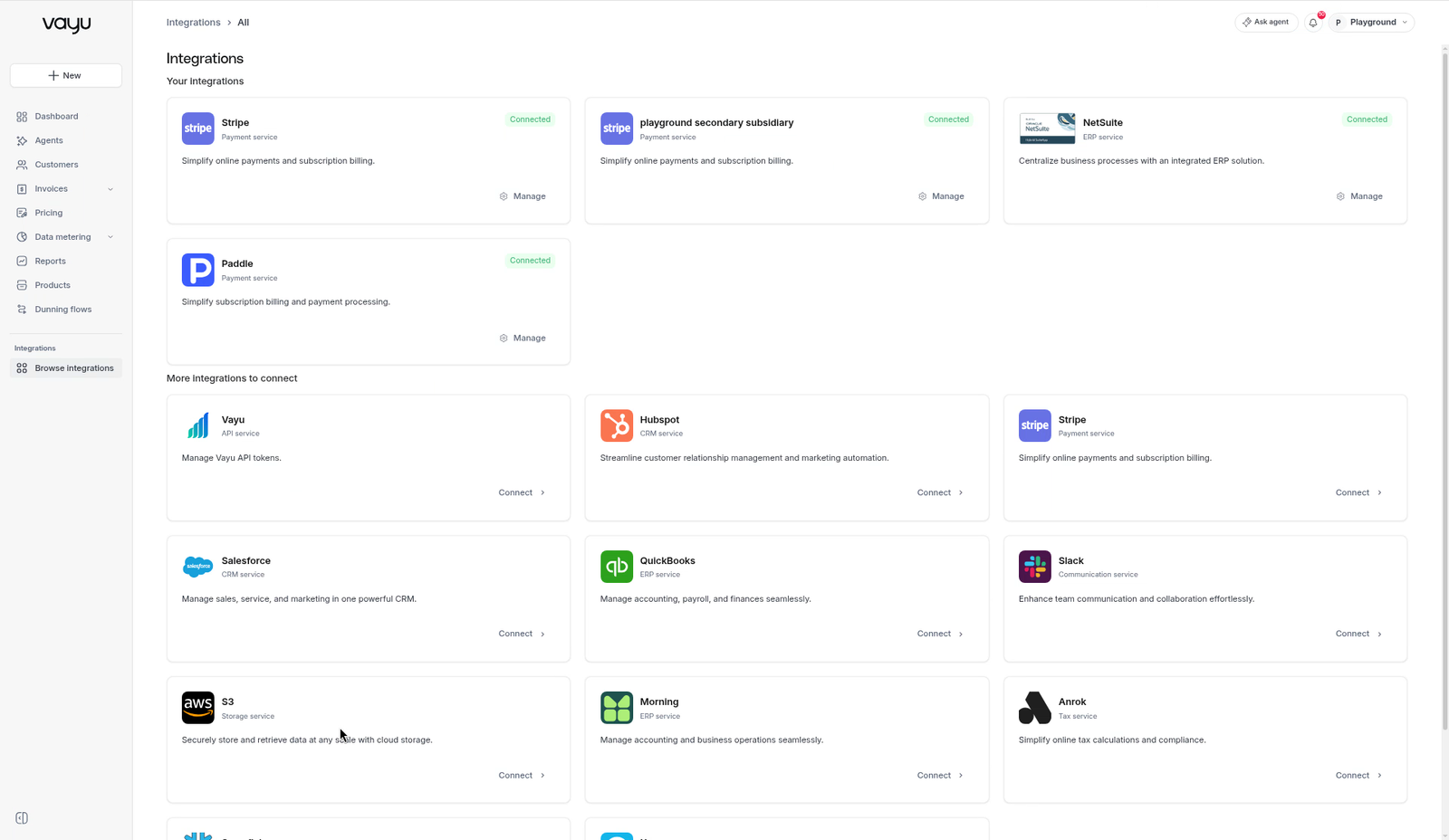
Under Copy your client id, click the copy icon to copy your Client id.
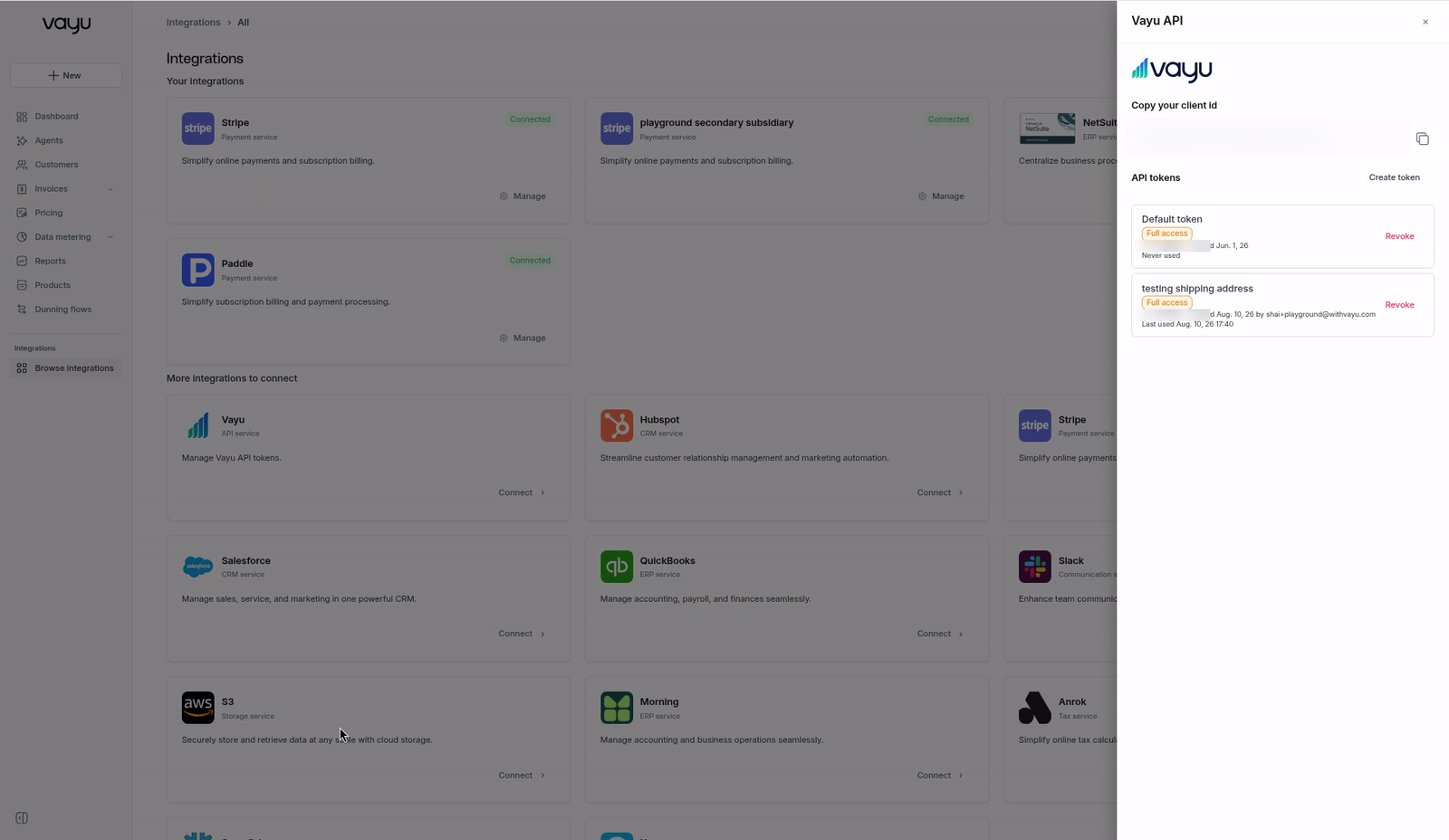
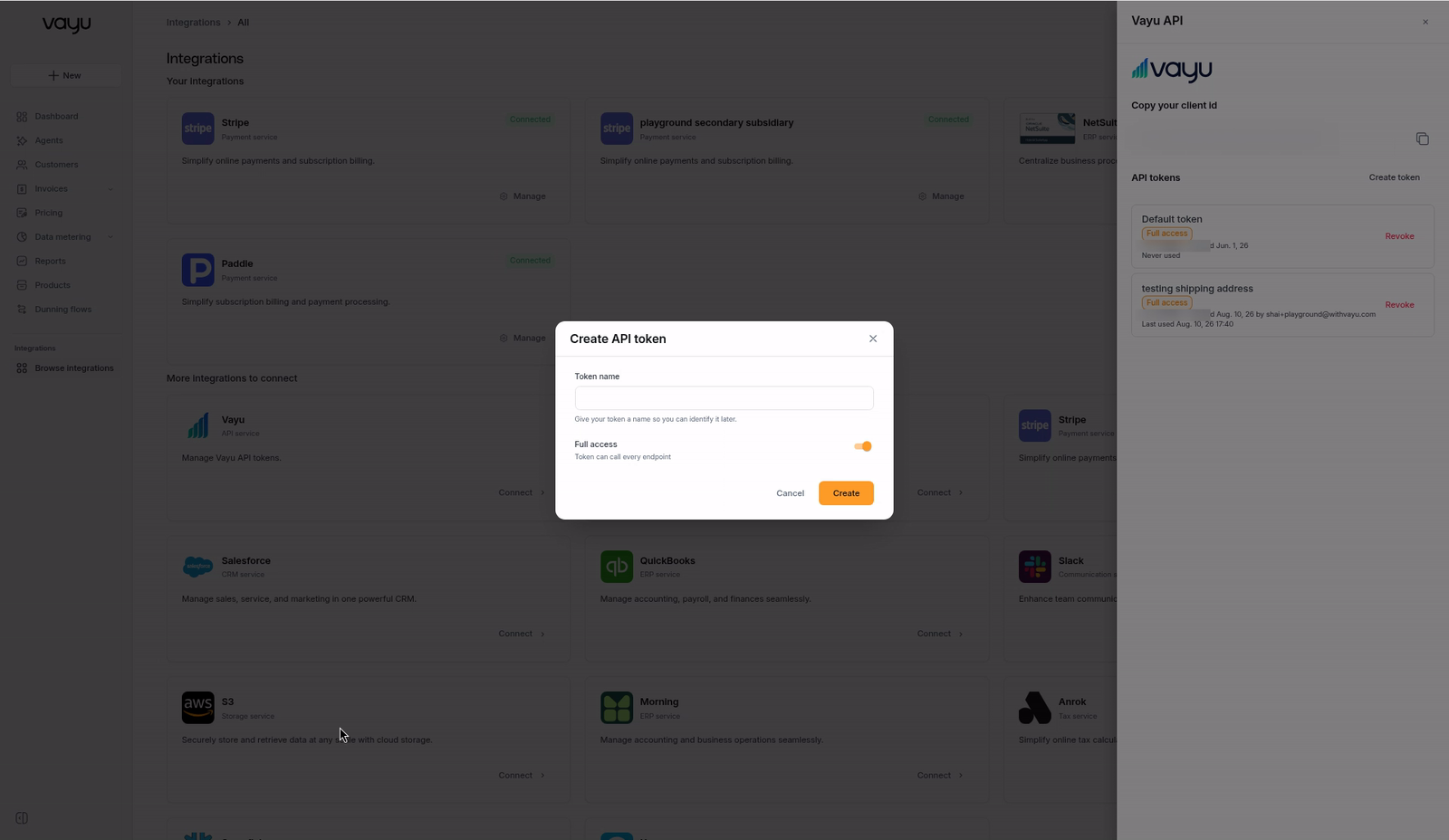
Next to API tokens, click Create token. In the Create API token dialog, enter a Token name so you can recognize the token later, for example Production backend (up to 64 characters).
Choose what the token can do:
- Leave Full access on to let the token call every endpoint.
- Turn Full access off to pick permissions. Tick Read and/or Write for each area you need. You must select at least one permission.
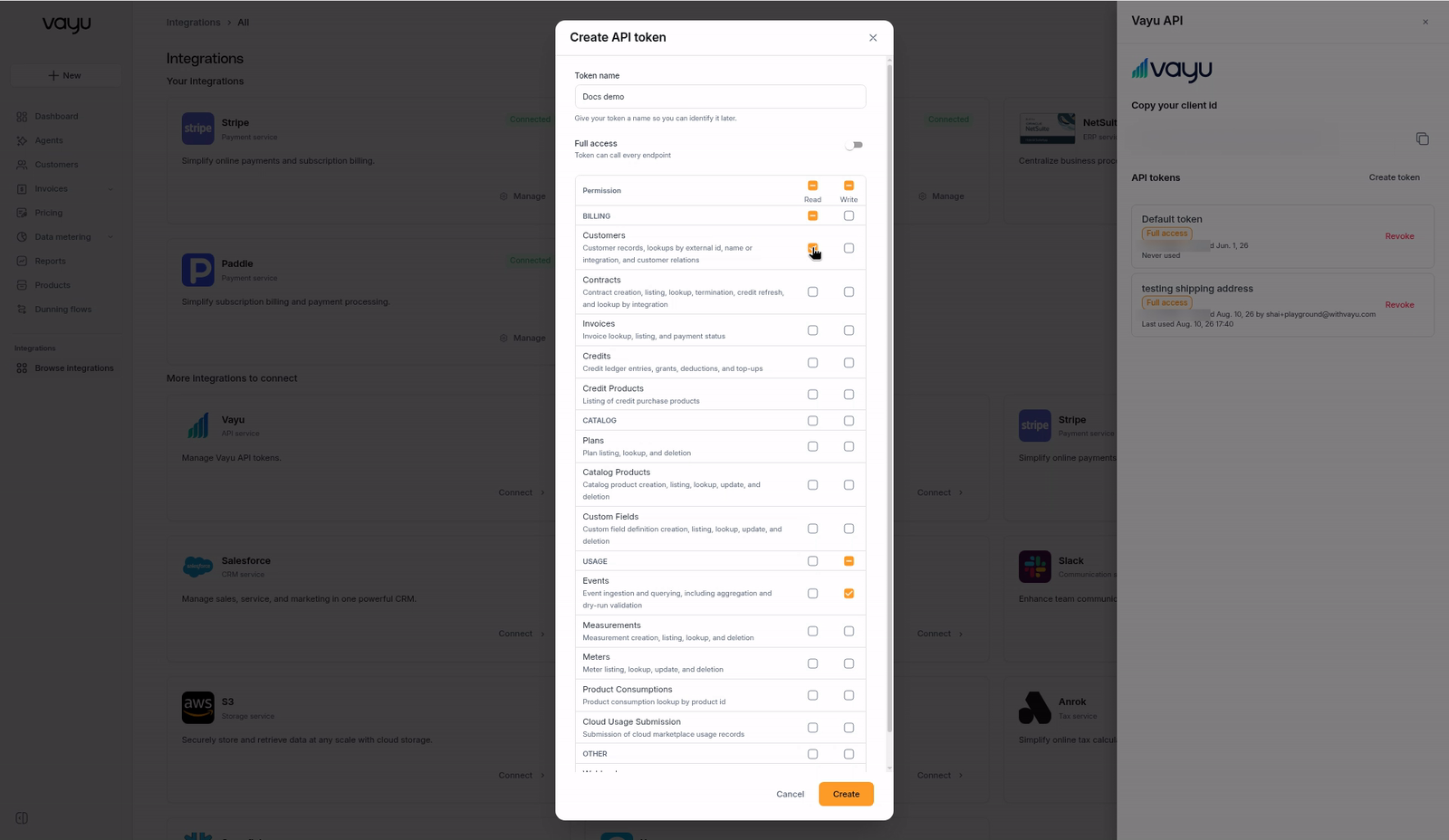
Click Create. The Copy your API token dialog shows the token. Copy it and store it somewhere safe, such as your secrets manager, then click Done.
The API token is shown only once. After you close the Copy your API token dialog you can't see it again. If you lose it, create a new token and revoke the old one.
Make your first request
Authentication takes two calls: exchange your API token for an access token, then use the access token on your API calls.
The base URL is https://connect.withvayu.com.
export VAYU_CLIENT_ID="<your client id>"
export VAYU_API_TOKEN="<your API token>"

# 1. Exchange the API token for an access token
ACCESS_TOKEN=$(curl -s -X POST "https://connect.withvayu.com/login" \
  -H "Content-Type: application/json" \
  -H "x-api-key: $VAYU_CLIENT_ID" \
  -d "{\"refreshToken\": \"$VAYU_API_TOKEN\"}" | jq -r '.accessToken')

# 2. Call the API with the access token
curl "https://connect.withvayu.com/customers" \
  -H "Authorization: Bearer $ACCESS_TOKEN" \
  -H "x-api-key: $VAYU_CLIENT_ID"
The /login response looks like this:
{
  "accessToken": "eyJraWQiOi...",
  "expiresIn": 3600,
  "expiresAt": "2026-10-12T11:30:00.000Z"
}| Token | Where you get it | Lifetime | How you use it |
|---|---|---|---|
| API token | Create token in the Vayu app | Doesn't expire. Valid until you revoke it in the Vayu app | Send as refreshToken in the body of POST /login |
| Access token | POST /login | 1 hour (see expiresIn, in seconds, and expiresAt) | Send as Authorization: Bearer <access token> on every call |
API tokens don't expire on their own. A token keeps working until you revoke it in the Vayu app.
Access tokens last 1 hour. Request a new access token before expiresAt, or when you get a 401 response. Each access token carries the permissions of the API token it came from.
With the Vayu SDK
The SDKs call /login and refresh the access token for you. Pass your API token when you create the client. You don't need to call login() yourself.
npm install vayu-tsThe TypeScript SDK reads your Client id from the CLIENT_ID environment variable, and fails to start if it isn't set.
import { Vayu } from 'vayu-ts';

// export CLIENT_ID="<your client id>"
const vayu = new Vayu(process.env.VAYU_API_TOKEN);

const customers = await vayu.customers.list();
import os
from vayu_sdk import Vayu
vayu = Vayu(api_key=os.environ["VAYU_API_TOKEN"])
customers = vayu.customers.list()go get github.com/vayucode/vayu-sdks/goimport (
"os"
VayuSDK "github.com/vayucode/vayu-sdks/go"
)
vayu := VayuSDK.NewVayu(os.Getenv("VAYU_API_TOKEN"))
customers, err := vayu.Customers.ListCustomers(nil, nil)For installation and more examples, see the SDK section.
Permissions
Give each token only the permissions it needs. For example, a service that only sends usage events needs Events → Write and nothing else.
- Read lets the token look up and list records (
GETrequests). - Write lets the token create, update, and delete records (
POST,PUT,PATCH, andDELETErequests). Write doesn't include Read, so tick both if the token needs both. - Full access lets the token call every endpoint, including endpoints that aren't listed below.
| Group | Permission | Covers |
|---|---|---|
| Billing | Customers | Customer records, lookups by external id, name or integration, and customer relations |
| Billing | Contracts | Contract creation, listing, lookup, termination, credit refresh, and lookup by integration |
| Billing | Invoices | Invoice lookup, listing, and payment status |
| Billing | Credits | Credit ledger entries, grants, deductions, and top-ups |
| Billing | Credit Products | Listing of credit purchase products |
| Catalog | Plans | Plan listing, lookup, and deletion |
| Catalog | Catalog Products | Catalog product creation, listing, lookup, update, and deletion |
| Catalog | Custom Fields | Custom field definition creation, listing, lookup, update, and deletion |
| Usage | Events | Event ingestion and querying, including aggregation and dry-run validation |
| Usage | Measurements | Measurement creation, listing, lookup, and deletion |
| Usage | Meters | Meter listing, lookup, update, and deletion |
| Usage | Product Consumptions | Product consumption lookup by product id |
| Usage | Cloud Usage Submission | Submission of cloud marketplace usage records |
| Other | Webhooks | Webhook subscription management |
In the Create API token dialog, the checkbox at the top of the Read or Write column selects that access for every area, and the checkbox on a group row selects it for the whole group.
You can't change a token's permissions after you create it. To change them, create a new token with the right permissions, switch your integration to it, and revoke the old one.
Manage and revoke tokens
The API tokens list in the Vayu API panel shows every token in your account. Each row shows:
- The token name and its permissions, for example Full access or Customers · Read & write.
- The last characters of the token, when it was created, and who created it.
- When it was last used, or Never used.
You can have several active tokens at once. Use a separate token for each integration or environment, so you can revoke one without affecting the others.
To revoke a token:
Click Revoke on the token's row.
In the Revoke API token dialog, read the warning and click Revoke token. To keep the token, click Cancel.
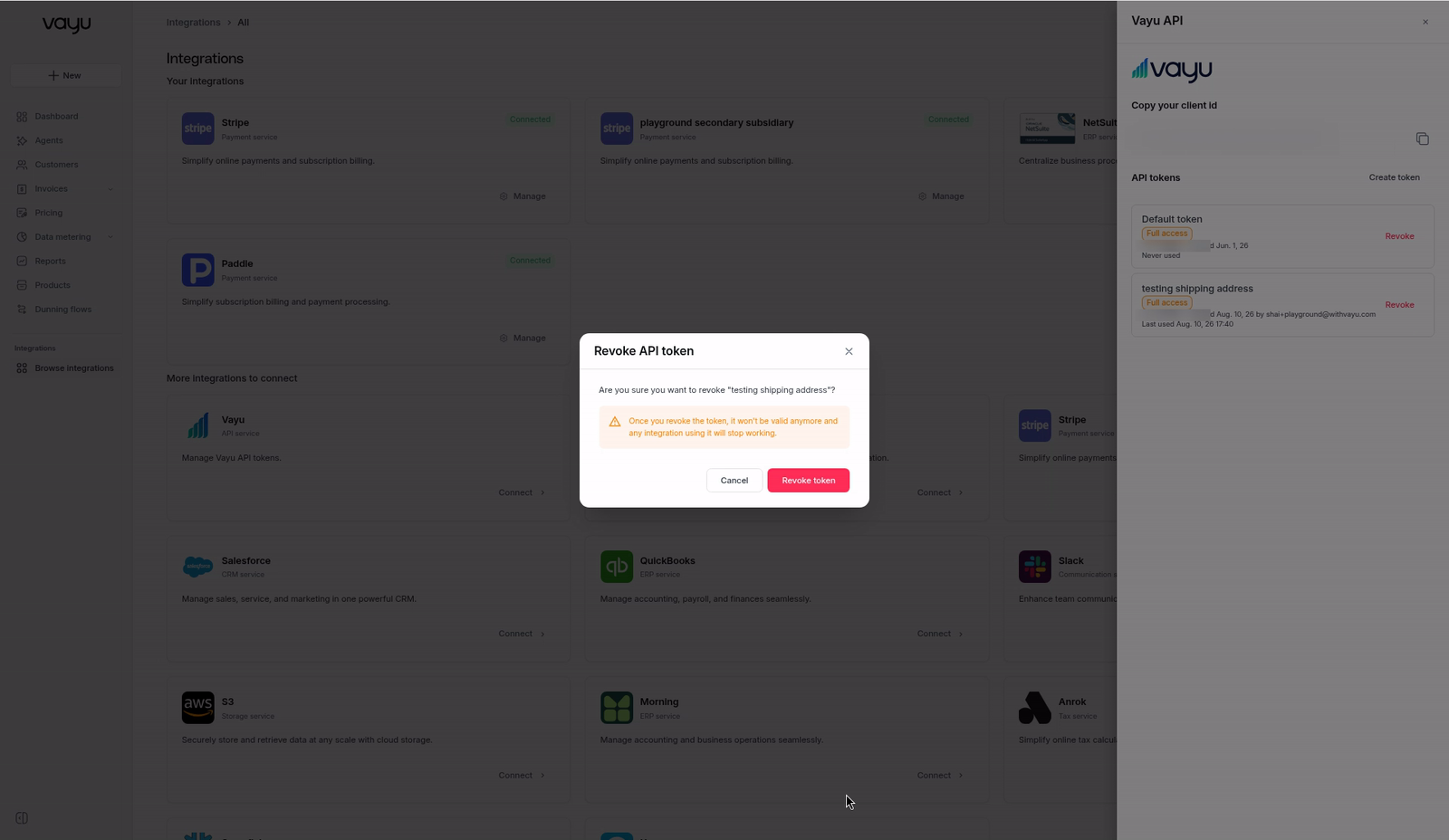
Revoking is immediate and can't be undone. Once you revoke the token, it won't be valid anymore and any integration using it will stop working.
Rotating a token: create a new token with the same permissions, update your integration to use it, check that it shows a recent Last used time, then revoke the old token.
Troubleshooting
| Response | What it means | What to do |
|---|---|---|
401 with code authentication_failed | The access token is missing, expired, or invalid, or the API token was revoked | Call POST /login again for a fresh access token. If /login also fails, create a new API token |
403 with code insufficient_scope | The token doesn't have the permission this endpoint needs. The requiredScope field names it | Create a token with that permission, or with Full access |
429 with code rate_limit_exceeded | Too many requests | See Rate Limits |
Example of a missing permission:
{
  "type": "permission_error",
  "code": "insufficient_scope",
  "message": "Token lacks required scope vayu.events.write",
  "requiredScope": "vayu.events.write"
}
requiredScope has the form vayu.<area>.<read|write>. For example, vayu.events.write means the token needs Events → Write.
Keep your Client id and API tokens secret. Never put them in client-side code or commit them to source control.